
Spring Data Interview Question - Identify & Optimize Slow SQL Queries
Optimization tips , code example, concepts and more...

Scenario
Your application is experiencing high latency and database CPU spikes.
You suspect inefficient SQL queries, but the system runs hundreds of queries per second, making it unclear which ones are the real bottlenecks.
You need a systematic approach to:
Identify problematic queries
Diagnose why they are slow
Apply optimizations safely in production
Naive Query Example
SELECT * FROM todo
WHERE name = ‘Install FooTool’;
Potential issues:
No index on
name→ full table scanSELECT *→ unnecessary I/O for unused columnsQuery may run frequently → multiplied impact
How would you systematically identify slow SQL queries and optimize them in a production system?
Detecting Slow Query
We should log slow query
ALTER SYSTEM SET log_min_duration_statement = 500; -- log queries > 500 ms
SELECT pg_reload_conf();
Now PostgreSQL logs slow queries automatically.
Postgres provides built-in stats:
SELECT query,
       calls,
       total_time,
       mean_time,
       rows
FROM pg_stat_statements
ORDER BY total_time DESC
LIMIT 10;
This reveals:
Queries consuming the most total time
Queries executed frequently
Queries returning too many rows
Optimize based on impact = frequency × cost
3. Monitor in dashboards
Typical production stack:
Prometheus + Grafana
pg_stat_statements exporter
APM tools
These help correlate slow queries with spikes in:
CPU usage
connection pool exhaustion
latency
Analyze Why the Query Is Slow
Use execution plans
EXPLAIN ANALYZE
SELECT * FROM todo WHERE name = ‘Install FooTool’;
Example problematic output:
Seq Scan on todo (cost=0.00..12000 rows=1)This means:
Full table scan
No usable index
We should look for red flag.
Sequential scan on big table → Missing index
Huge row mismatch (estimated vs actual) → Bad statistics
Sort or hash spilling to disk → Not enough memory
Nested loop on large datasets → Wrong join strategy
The execution plan tells us what the optimizer thinks is cheapest, not what actually is.
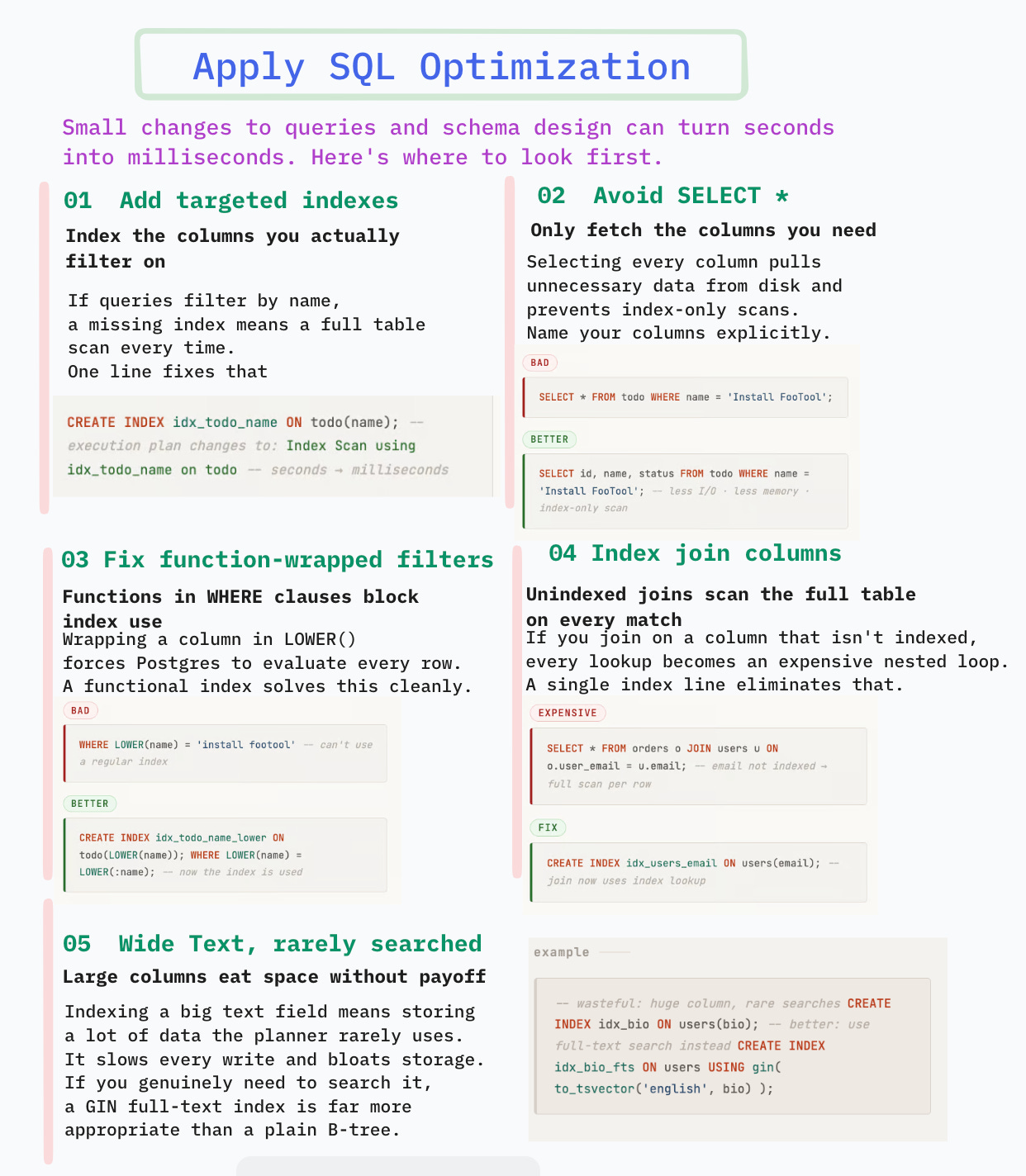
Apply Optimizations
Add indexes where they matter
If queries filter by name:
CREATE INDEX idx_todo_name ON todo(name);Now execution plan becomes:
Index Scan using idx_todo_name on todoThis reduces runtime from seconds → milliseconds.
Avoid SELECT *
Bad:
SELECT * FROM todo WHERE name = ‘Install FooTool’;Better:
SELECT id, name, status
FROM todo
WHERE name = ‘Install FooTool’;
Benefits:
Less disk I/O
Less memory usage
Enables index-only scans
Rewrite inefficient filters
Bad pattern:
WHERE LOWER(name) = ‘install footool’Better:
CREATE INDEX idx_todo_name_lower ON todo(LOWER(name));

SELECT id, name
FROM todo
WHERE LOWER(name) = LOWER(:name);
Now the index can be used.
Fix joins
Bad:
SELECT *
FROM orders o
JOIN users u ON o.user_email = u.email;
If email isn’t indexed → expensive join.
Fix:
CREATE INDEX idx_users_email ON users(email);Limit result sets
Bad:
SELECT * FROM logs ORDER BY created_at DESC;Better:
SELECT id, message
FROM logs
ORDER BY created_at DESC
LIMIT 100;
Reduces:
sort cost
network transfer
memory usage
Validate Improvements Safely
Always compare before/after:
EXPLAIN ANALYZE <query>;Look for:
Lower execution time
Fewer rows scanned
Index usage
Never assume optimization works — verify.
Trade-offs and Risks
Index trade-offs
Pros:
Faster reads
Better join performance
Cons:
Slower inserts/updates
More disk space
Can mislead optimizer if unused
Query rewriting risks
Might break edge cases
Might change result ordering
Might hide logic bugs
Always test with production-like data
Over-optimization risk
Optimizing rarely used queries wastes effort.
Prioritize:
Impact = latency × frequency × user visibilityHere is the visual summary:
📢 Get actionable Java/Spring Boot insights every week — from practical code tips to real-world use-case based interview questions.
Join 6200+ subscribers and level up your Spring & backend skills with hand-crafted content — no fluff.
🎯 Early Supporter Offer
The first 100 paid subscribers get the annual membership at $50/year.
👉 70 already joined — only 30 spots left.
Not convinced? Check out the details of the past work
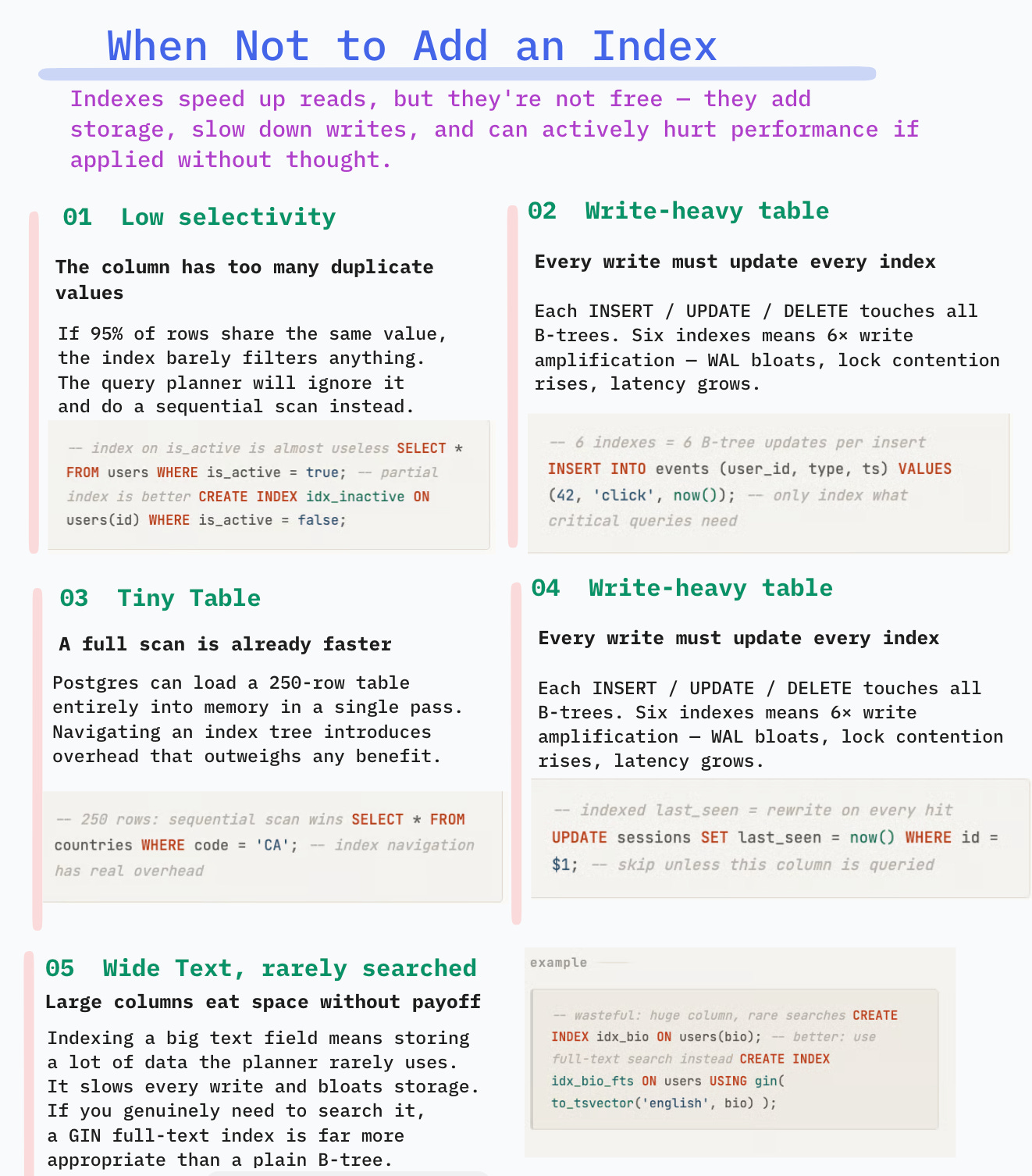
Can you explain when would you not add an index on the column?
Indexes speed up reads, but they aren’t free. They add storage, slow writes, and can even hurt performance if misused.
Column Has Low Selectivity
If many rows share the same value, the index won’t filter much.
Example
SELECT * FROM users WHERE is_active = true;If 95% of users are active:
Index lookup returns almost entire table
Planner prefers sequential scan
Index adds overhead without benefit
Index on boolean columns is usually useless unless highly skewed.
Exception: partial index
CREATE INDEX idx_active_users
ON users(id)
WHERE is_active = true;
2. Table Is Write-Heavy
Every insert/update/delete must update all indexes.
If the table receives heavy writes:
Index maintenance becomes expensive
WAL grows
Lock contention increases
Insert latency rises
Example:
Event ingestion table:
INSERT INTO events (...)If we add 6 indexes:
Each insert touches 6 B-trees
Write amplification increases
Throughput drops
For high-write tables, add only indexes needed for critical queries.
Small Tables
For small tables, sequential scans are faster than index lookups.
Postgres can read the entire table in memory faster than navigating an index tree.
Example :
SELECT * FROM countries WHERE code = ‘CA’;If table has only 250 rows:
Index unnecessary.
4. Highly Volatile Columns
Columns that change often cause index churn.
Example
UPDATE sessions SET last_seen = now();If indexed:
Every update rewrites index entry
Causes bloat
Requires frequent vacuuming
Avoid indexing frequently updated fields unless essential.
Wide Text Columns Used Rarely
Indexing large text columns:
Uses lots of space
Slows writes
Rarely helps unless searched often
CREATE INDEX idx_bio ON users(bio);Bad unless:
We search bios frequently
We use GIN / full-text index instead
Visual Summary:
📚 Helpful Resources (5)
Subscribe | Sponsor us | LinkedIn | Twitter
Happy Coding 🚀
Suraj
Great post!